-
Employee Info Center
-
-
- Employee Portal (ESS)
- Employee Self-Service Portal Access
- Employee Social Security Number (SSN) Edits
- How do I disable pop-up blockers?
- How do I reset my web password?
- How does a new hire employee begin paperless onboarding ?
- I forgot my web username, can I reset it?
- Payroll & Benefits Onboarding for New Hires
- What is an Account Access Confirmation?
- Why can't I get my SECURITY CODE for Employee Self Service Account Access?
- Web Portals
- Account Security & Multi-Factor Authentication (MFA)
- Email Address Requirements
- Employee Handbooks
- Employee Support
- Employment & Salary Verifications
- How does a new hire employee begin paperless onboarding ?
- Payroll & Benefits Onboarding for New Hires
- Report a Workplace Concern
- What are your office hours?
- What is the status of my job application?
- Web Portals
-
-
- All Benefits & Perks
- AT&T Wireless Discounts
- Auto and Home Insurance (Save 15%)
- Corporate & Personal Travel Deals You Can't Find Anywhere Else
- FinFit - Personal Financial Tools for Employees
- MetLaw Legal Plans
- MetLife Aura Identity Theft Plans
- MetLife Pet Insurance
- Wages on Demand - Earned Wage Access
- Champion Health - The CHAMP Plan
- Auto Hero
-
- All Benefits & Perks
- Understanding Your Employee Benefits
- Open Enrollment
- How To Save On Medical costs
- Benefit Basics Video
- Annual Plan Contribution Limits
- Qualifying Life Event (QLE)
- Who can I add as a dependent for my benefit coverage?
- Why isn't the benefit enrollment portal opening for me in the Employee Portal?
-
-
- Group & Voluntary Life Insurance Coverage for Dependents (MetLife)
- Group Dental Insurance (MetLife)
- Group Vision Insurance (MetLife)
- Voluntary Health: Physician, Urgent Care, Hospital, Dental, Vision, and Wellness Benefits, Inpatient, $0 Telemed (Hooray Health)
- WellCall360 - Voluntary Wellness + 0$ Tele-med, Rx, Dental, Vision (Hooray Health)
- Whole Life Insurance with Long-Term Care
-
- Voluntary Benefit Programs
- Short-term and Long-term Disability Insurance (MetLife)
- Group & Voluntary Life Insurance Coverage for Dependents (MetLife)
- Accident Insurance (MetLife)
- Critical Illness Insurance (MetLife)
- Hospital Indemnity Insurance (MetLife)
- Whole Life Insurance with Long-Term Care
- MetLaw Legal Plans
- MetLife Aura Identity Theft Plans
- MetLife Pet Insurance
- Voluntary Health: Physician, Urgent Care, Hospital, Dental, Vision, and Wellness Benefits, Inpatient, $0 Telemed (Hooray Health)
- WellCall360 - Voluntary Wellness + 0$ Tele-med, Rx, Dental, Vision (Hooray Health)
- Champion Health - The CHAMP Plan
- Auto Hero
-
- Flex Spending Accounts
- How To Save On Medical costs
- Medical Expense FSA
- Premium Only Plan FSA
- Dependent Care FSA
- Annual Plan Contribution Limits
- Commuter, transit, and parking FSA
- Health Savings Accounts (HSA)
- Limited Purpose Flex Spending Account (LPFSA)
- FSA - Member Portal (year 2020 and previous)
-
Manager Info Center
-
- Employee Onboarding
- Workers Compensation Program and Policy Administration
- 401k Retirement Plan Services
- Document Management System (DMS)
- Leave Requests: PTO Tracking & Approvals
- Employment & Salary Verifications
- Corporate & Personal Travel Deals You Can't Find Anywhere Else
- Employee Earned Wage Access (EWA)
- Learning Management System (LMS)

-
- Applicant Tracking System (ATS)
- Background and Drug Testing
- Labor Poster Compliance Solutions for Local and Remote Workers
- Business Insurance
- Employee Portal Messaging-Alerts
- Performance Management (PM)
- R&D Tax Credit (R&D)
- Short-term Payroll Funding
- Work Opportunity Tax Credit (WOTC)
- Secure 2.0 for Employers
- Learning Management System (LMS)
-
- Affordable Care Act (ACA) Compliance
- Employee Handbook Program (Core+)
- FMLA Compliance
- Full-Service Payroll & Employment Tax Administration
- HR Toolkit
- Labor Poster Compliance Solutions for Local and Remote Workers
- Onboarding Your New Hire onto the Payroll System
- Time Keeping Solutions Introduction
- Workers Compensation Program and Policy Administration
- Workplace Safety Program Assistance
-
- Full-Service Payroll & Employment Tax Administration
- Office Schedule, Payroll Processing Cutoff Dates, Federal Reserve Bank Holidays, System Maintenance Schedule
- Direct Deposit
- Employee Earned Wage Access (EWA)
- Employment & Salary Verifications
- Minimum Wage Map
- Payroll Timesheet Imports
- Payroll VISA Paycard (employer)
- Submitting Payroll Hours, Salary, Commissions, etc.
- Short-term Payroll Funding
-
- Employee Onboarding
- How does a new hire employee begin paperless onboarding ?
- Onboarding Your New Hire onto the Payroll System
- Payroll & Benefits Onboarding for New Hires
- How do I process the paperless I-9?
- Background and Drug Testing
- Employee Termination Processing
- I-9 Part 2 Approval Guide
- Unemployment Processing
- RE-HIRES
-
- All Benefits & Perks
- 401k Retirement Plan Services
- Affordable Care Act (ACA) Compliance
- Employee Assistance, Wellness, and Lifestyle Programs (EAP)
- Employee Benefit Plan Administration
- FinFit - Financial EAP
- Flex Spending Accounts
- Group & Voluntary Life Insurance Coverage for Dependents (MetLife)
- Voluntary Benefit Programs
-
-
- Workers Compensation Program and Policy Administration
- Claims Management and Administration Assistance
- Employment Practice Liability Insurance (EPLI)
- Workplace Safety Program Assistance
- Business Insurance
- Report a Workplace Concern
- Report a Workplace Injury
- Secure Upload Documents
- WC CLAIMS FORMS BY STATE
-
- Document Management System (DMS)
- Employee Portal Event Management
- Employee Portal Messaging-Alerts
- Employee Record Maintenance in the Manager Portal
- Employee Social Security Number (SSN) Edits
- I-9 Part 2 Approval Guide
- Training Support in the Manager Portal
- Training Tutorials and Demonstrations - Worksite Managers and Administrators
- Technical Product Support Requests

AdvanStaff Learning (LMS)
Onboarding, Training, Compliance.
Talk to your Dedicated HR Specialist to get started!
Powered by:

AdvanStaff HR Learning Management
Deliver learning that’s relevant, accessible, and aligned to real roles, skills, and business needs.
Learning works best when it’s connected to roles, goals, and real work. AdvanStaff Learning Management System (LMS) brings structure, flexibility, and insight to learning — so development stays relevant, measurable, and aligned with how your organization grows.
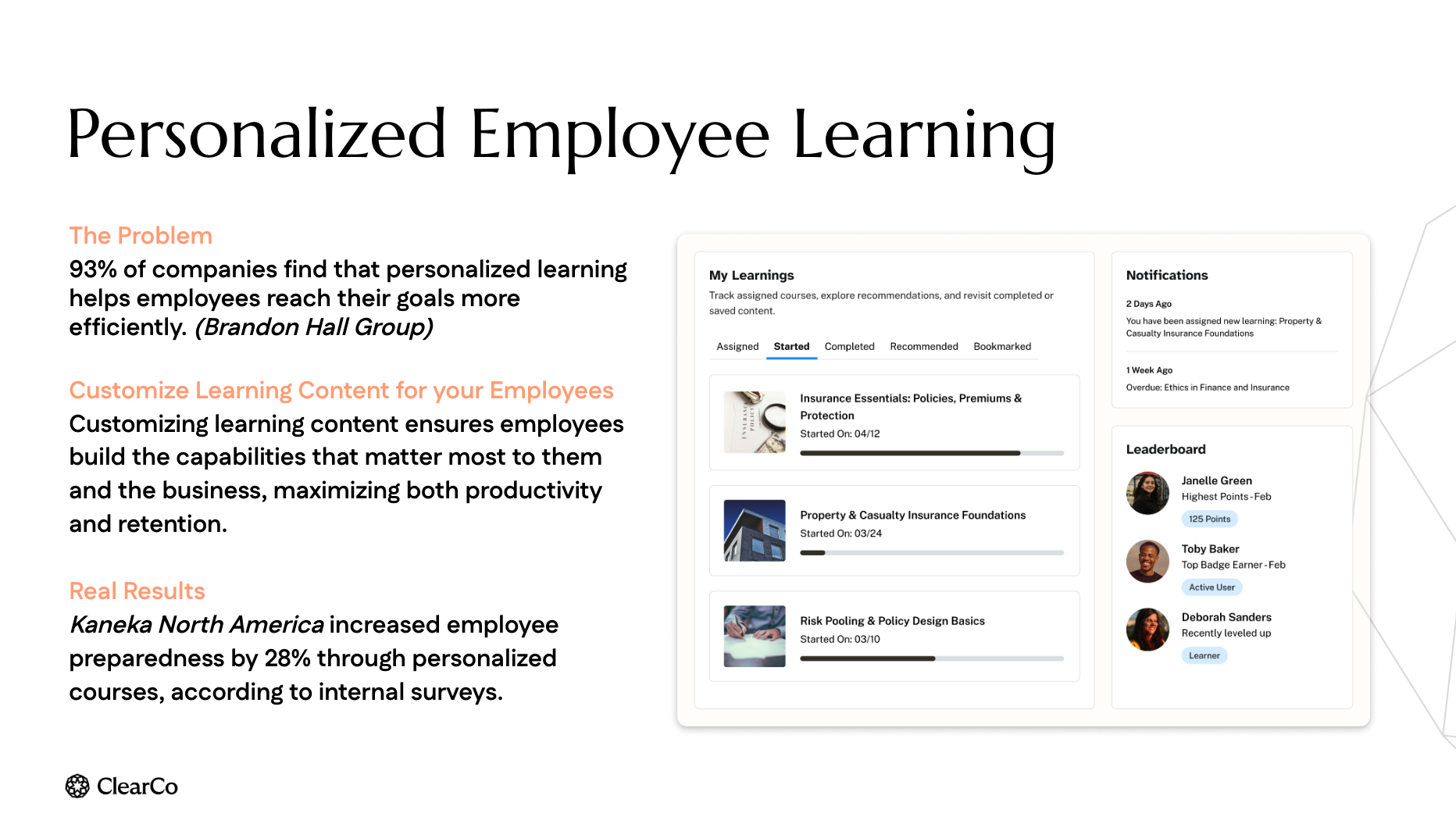
Transforms training into a strategic asset
Instead of disconnected courses and static content libraries, AdvanStaff Learning connects learning to skills, onboarding, and growth—so development actually supports the work people do and the future your organization is building.
Build skills that matter
Deliver learning that’s relevant, accessible, and aligned to real roles, skills, and business needs.
From courses to capability
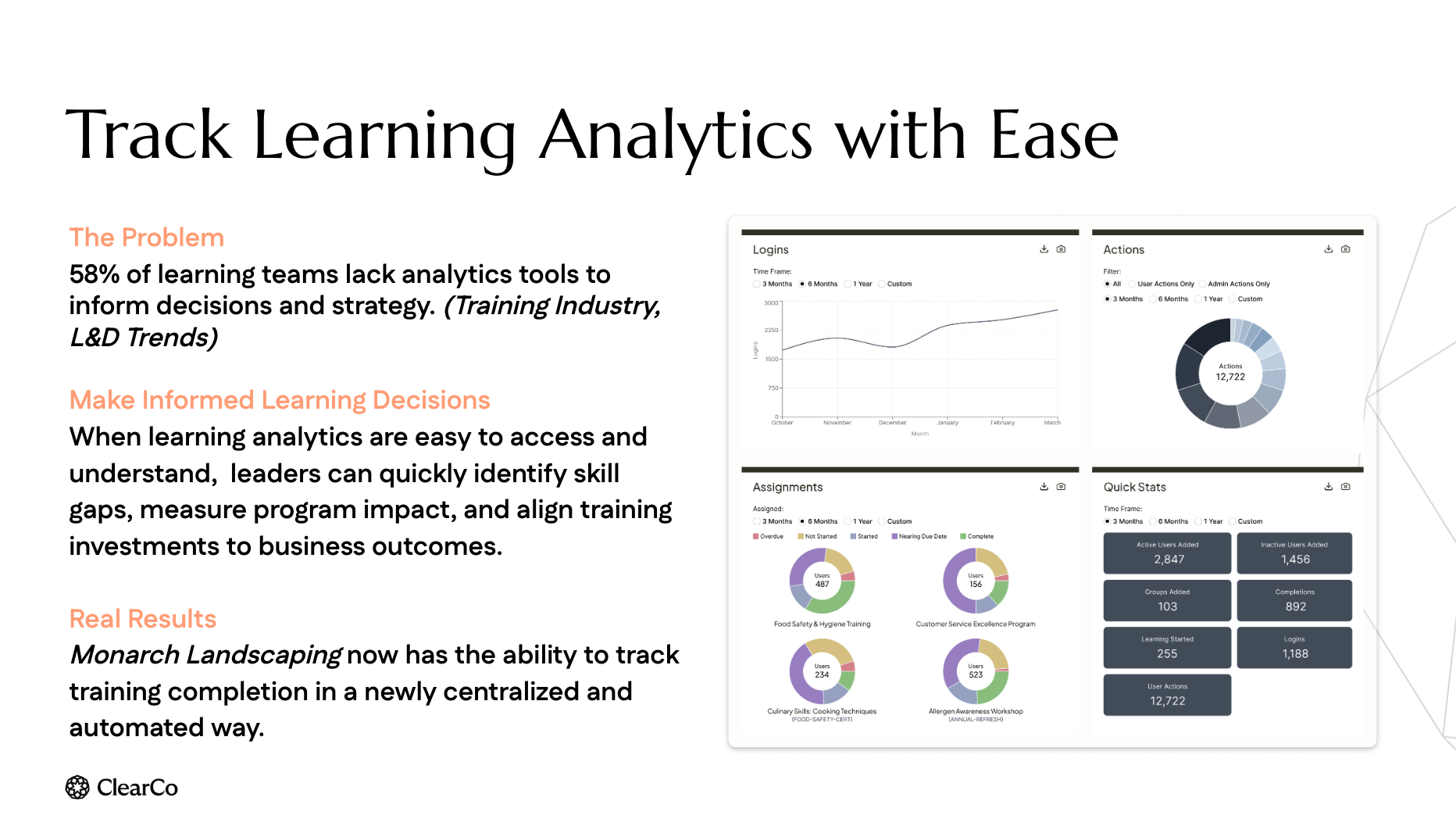
AdvanStaff Learning personalizes learning journeys, scales content creation, and delivers insight into what’s working—so learning investments translate into real capability and performance.
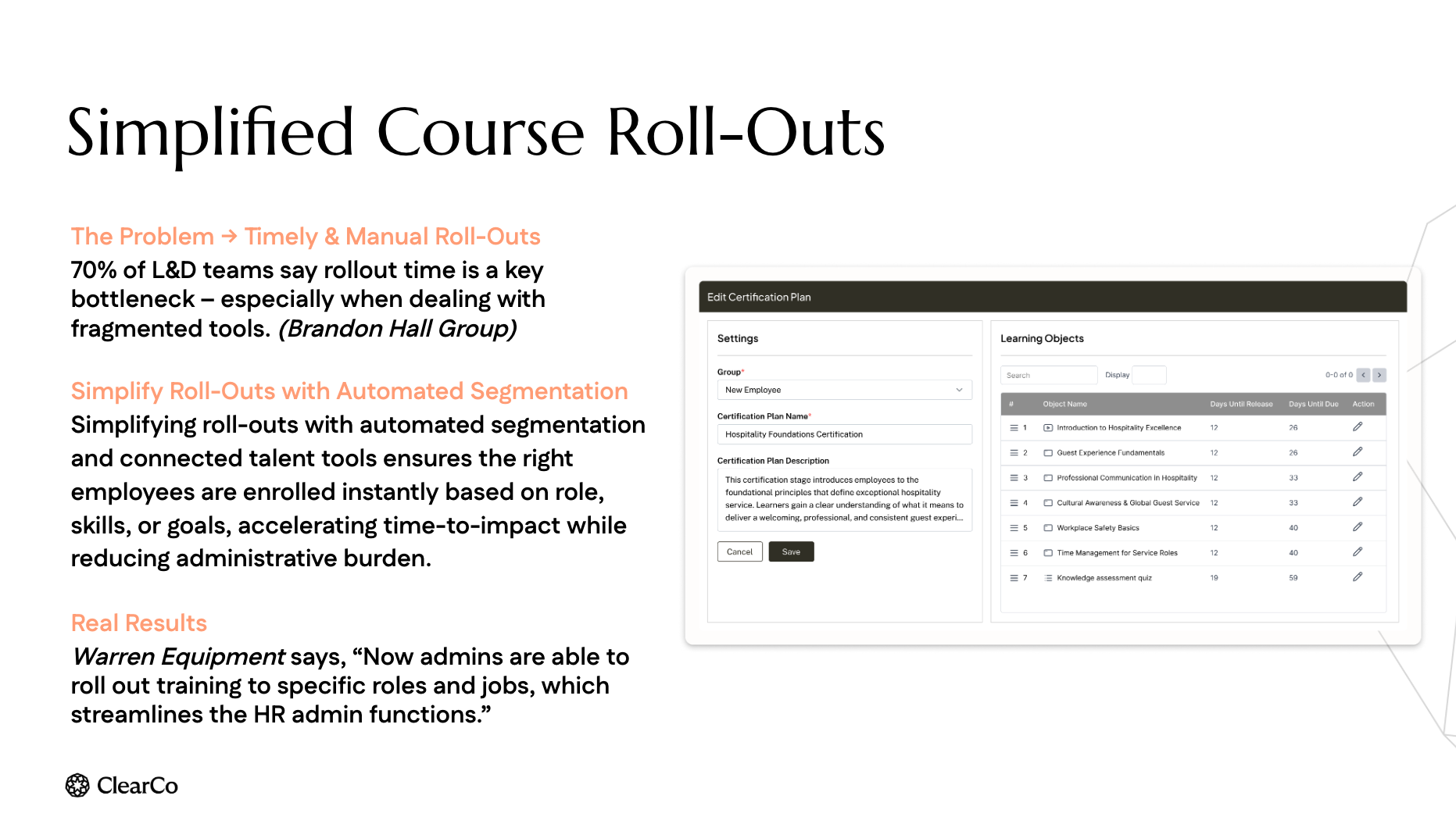
Automated, Role-based Segmentation
- Customized Role Segmentation
- Non-Employee Access
- Easy Course Enrollment
- Automatic enrollment available based on location, department, role, project, job
Customize Learning Content
- Over 11,000 Courses in the Library
- Simple Course Builders and Wizards
- Comprehensive Compliance Training Library
11,000+ Courses
Courses are continually reviewed, updated, and added. All courses in the catalog are included so you can build and customize your ideal library.
- Unlimited access to all 11,000+ courses
- Build your own training track or pick from a list of popular courses.
- General & Specific Topic Trainings
- OSHA / Safety Compliance
- Workplace Harassment & Violence
- Industry Specific Trainings
- And much more!
Build or add your own courses using the course builder.
Effortless, Bi-Directional Integration with AdvanStaff HR
Automate new hire data transfers from ClearCo to the AdvanStaff HR system. Any employees maintained in the AdvanStaff HR system are updated and sent back to ClearCo.
Unify employee data to a single HR-friendly system of record for all your people.
Reduce errors, manual data entry, and incomplete records.
Save time for HR and IT Teams. Let the integration manage data transfers and mapping fields between systems.
Single-Sign-On
Faqs
To protect the enterprise, promote a safer work environment, and train and enhance employee productivity.
- Harassment charges filed with the EEOC rose 47% — from 21,270 in FY 2021 to 31,354 in FY 2023 — with monetary recoveries climbing to $202.2 million in FY 2023 alone.1
- Sexual harassment charges rose from 5,581 to 7,732 between FY 2021 and FY 2023, with roughly $60 million in annual monetary recovery tied to those claims.1
- Sexual harassment claims accounted for 18.2% of all EEOC monetary benefits recovered between FY 2018–2021, up from 12.4% in FY 2014–2017 — totaling $299.8 million for over 8,100 individuals.2
- In FY 2024, the EEOC secured nearly $700 million for more than 21,000 victims of employment discrimination overall — the highest recovery in the agency’s history.3
Sources:
1. U.S. EEOC annual charge statistics (FY 2021–FY 2023), as reported in Littler, “Challenging Harassment in the Workplace: A Key Priority at the EEOC,” July 2024.
2. U.S. EEOC, “Sexual Harassment in Our Nation’s Workplaces,” Office of Enterprise Data and Analytics, Data Highlight No. 2. eeoc.gov
3. U.S. EEOC, “EEOC Publishes Annual Performance and General Counsel Reports for Fiscal Year 2024,” Jan. 17, 2025. eeoc.gov
Per employee Per Month
Pay a flat amount per employee per month
+ a one-time setup/activation fee
Unlimited Learning
Unlimited courses for all employees. Build as many tracks as you want.
Contact your dedicated HR Specialist for pricing
To get started, please reach out to your assigned HR Specialist.
Please allow five to ten business days for setup and configuration.
No additional charges for unlimited, state-mandated sexual harassment courses
- California-, Connecticut-, Delaware-, and New York- AND OTHER specific sexual harassment courses satisfy state requirements
- Training courses available for both employees and managers
- There is no additional charge for these courses

Managers can add their learning program customized to their company culture and industry. The courses can be in many formats, or use the AI course builder (additional fee).
- Assign learning groups to employees, managers, new hires, and more.
- Unlimited courses for each learner group. No pay-per-view.
- Assign courses based on employee classification and function.
- Ensure compliance with manager- and employee-specific training requirements.

In addition to manager and employee success courses, we offer several industry-specific training libraries.
Industry-specific training:
- Hospitality
- Healthcare & Medical Office
- Manufacturing
- General Safety
- COVID-19 Preparedness
- Restaurant
- Transportation
- Chemical & Environmental Safety
- HR Manager training
- Stress Management
- Construction
- Electricians
- Warehouse & Manufacturing
- Remote working
- and much, much more!
Easily convert between formats to deliver learning in SCORM, AICC, xAPI, video, audio, PDFs, and more.
Awesome Automation
The AdvanStaff HR LMS is directly tied to the AdvanStaff HR Cloud (Prism), so employee information is seamlessly transferred from one system to the next; no employee data entry is required.
Group automation is enabled by default. Groups are automatically created and updated based on factors like department, location, and division. You can manually create even more group options, such as job title, state of employment, etc.
Manually adding employees
The worksite manager may choose to assign courses to non-employee users. In this case, the worksite manager would manually add the user using the LMS interface.
- LMS users log in via a link from the Employee Portal
- Adding employees, deletions, or updates to the employee group assignments can be handled by the worksite manager from within the LMS portal
How to…..
The Learning Management System integrates with the manager (MSS) and employee (ESS) portals. Employees and managers must use the MSS and ESS portals to access the LMS. There is no requirement to store an additional username or password.
The system uses user credentials and knows automatically if the user is a manager or employee user
Managers and employees can access the LMS in a few ways:
- Manager Portal (MSS/Prism):
- HR Menu -> HR | Other -> HR -> Learning (LMS)
- Employee Portal (ESS):
- Default Dashboard -> “Learning” menu item
There are a few methods to assign courses to employees.
- Individual assignment
- Ad Hoc course assignment
- Bulk Assign by Group
- All employees in a group can be assigned a course in bulk.
- If a course is reassigned to a group, the LMS administrator may “skip” those users who have already completed it, or the administrator may “re-assign” courses to be taken again. “Reassigning courses is helpful for annual course requirements.
The following are the steps to assign courses to groups:
- Identify an existing GROUP or create a new GROUP using the “Group Management” on the left main menu.
- Groups labeled (auto) are dynamically built groups that the AdvanStaff HR system will auto-populate based on the named convention. The groups will auto-enroll all members who qualify. Members may not be removed from auto groups. If the criteria do not match your needs, create a “custom” group.
- Select the group you want to manage from the list and click the “Manage Group” button.
- Click on “Bulk Assign”
“Bulk Assign Course” will be assigned to all members of the GROUP. The next step is to set a DUE DATE so notifications and deadlines will be defined.