Applicant Tracking System (ATS)

Applicant Tracking System (ATS)
Best-in-class Recruiting Software
Discover Recruiting Happiness
Every Client gets a FREE Essential Account with FREE monthly listing!
AdvanStaff offers a sophisticated applicant tracking system that enables your company to seek, screen, categorize, manage, and efficiently progress applicants through the application and hiring process. Our system allows one free monthly concurrent job posting and is reasonably priced for additional postings. It also supports posting to approximately 17 free job boards and allows you to upgrade to paid job boards when you deem appropriate.
The system uses the latest technology, is easy to use, and allows you to directly move an applicant into “hired” status in our pay systems.
Don’t hesitate to contact your AdvanStaff HR Specialist to learn more about your options.
What Is PrismHire ATS?
It’s our powerful applicant tracking system that simplifies the entire recruitment process and is fully integrated with your current PrismHR suite.
Hiring doesn’t have to be timeconsuming and labor-intensive. With PrismHR Hiring, you can toss out paper files and stacks of resumes, plus you’ll be able to:
- Use Ai to build job descriptions and evaluate applicants, and help your hiring manager
- Post your jobs to multiple job boards in just one-click
- Post jobs to your website using a pre-built widget
- Keep all applicant information in one place within your existing PrismHR platform
- Manage interview scheduling and communications with candidates
- Access world-class support and assistance in setting up your accounts
- Qualify applicants using preemployment testing, background checks, references, and MUCH MORE!
- PrismHR Hiring integrates with your AdvanStaff HR manager portal and transfers all information into electronic onboarding with just a few clicks, saving managers and employees time.
- Upgrade listings to paid programs offered by the most popular job posting site, all in one place from your PrismHire ATS account/dashboard.
Your account includes unlimited support.
IMPORTANT NOTE:
Indeed has restrictive guidelines for duplicate postings from the same company. If a client company has a direct Indeed account in addition to an Indeed account within the PrismHire ATS, there is a strong possibility paid postings with Indeed will NOT post on either platform. Please disable direct accounts with Indeed before considering a paid Indeed listing using our ATS.
PrismHire Included Core Features
Hiring managers will love using our intuitive, AI-fueled, and full-featured recruiting platform to attract, engage, and hire great candidates.
Job Requisition Workflows
Take the work out of workflow with our simplified process for opening, approving, and posting job requisitions.
Online Job Postings
Automatically post to a network of top job boards to ensure your postings appear on the sites ideal job candidates frequent.
Careers Page
Showcase employer brand with a customizable careers page.
Applicant Ratings & Scorecards
Confidently share opinions and reduce bias in the process with multiple reviews and star ratings to rank your top talent.
Assessment Tools & Screening
Do your due diligence with integrated pre-employment screening and background checks.
Calendaring & Scheduling
Take the back-and-forth out of interview scheduling for candidates and hiring managers with real-time access to calendars.
Messaging
Communicating with candidates has never been easier with SMS messaging and customizable email templates.
Permissions That Work For You
Keep your team focused. Set permissions to account for every role, from Administrator to Read-Only.
Applicant Analytics™
Identify your most effective recruiting channels and optimize your efforts with advanced data and reporting.
Applicant Tracking Features
- Activity Feed
- Form Builder™ Custom Application Forms
- Applicant Tagging & Filtering
- Branded Careers Page
- Calendaring & Candidate Self-Scheduling
- Custom Job & Applicant Fields
- Job Boards Distribution
- Job Descriptions✨
- Messaging Templates
- QR Code to Apply
- SMS to Apply
- SMS & Texting
- Onboarding Documents & Offer Letters
- Pay Rate✨
- Referral Program
- Reporting & Analytics
- Resume Import & Parsing
- Resume Screening✨
- Scorecards & Star Ratings
- Video Conferencing
- Unlimited Users
- Advanced User Roles & Permissions
- Staffing and Multi-site Versions
Integrations
- Job Board Distribution
- Background Checks & Screening
- Form I-9 & E-Verify
- Pre-hire Assessment Tools
- Reference Checks
- Video Interviewing
- WOTC
- EEOC
- Email and Calendars
- Workflow Tools i.e., Slack
Product
- Full end-user support
- Developer-friendly API & Webhooks
- Disclosure Statements
- EOE & OFCCP Data Collection
- Security & Reliability
- Single Sign-On (SSO)
How Do I Get Started?
Getting Started is easy. The worksite manager portal already has the service available.
Simply:
- Log into the worksite manager portal
- Click on the “My Employees” Link
- Click on the HR Action | Hiring
If you would like to a formal introduction to Applicant Tracking System options and features, a one-on-one training, or simply a refresher course:
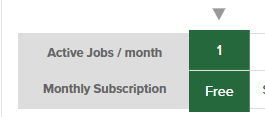
Each account receives free access to the full-featured ATS that includes up to one (1) active concurrent listing free of charge.
Upgraded billing tiers are based on the number of active listings/jobs per month. Billing tiers are based on the total number of jobs: 3, 5, 10, 15, 20, 25, and so on. Pricing can be found in the ATS portal and is subject to change.
Please reach out to your assigned HR specialist with any questions. Each client receives a free “Essentials” account and can view pricing tiers and feature set.
Each client’s worksite location is awarded one FREE Essentials account and one FREE active posting in perpetuity.
Worksite managers can test and use the system for free if there is one active listing (or fewer) at any time.
If you need additional active concurrent listings, a higher-tier package is required.
Billings are made in arrears. This means you will be billed the following month for the highest number of active jobs during the previous month.
For example, if you have a free license (tier 1) and upgrade to the 4-seat license (tier 3) on the 20th, you will be billed the tier 3 price the following month.
PrismHire offers no partial-month billing or pro-rated refunds.
No. You must agree to upgrade the tier when you post more jobs through the applicant tracking system.
Managers can easily adjust (up or down) the number of licenses/Billing Tiers they need. Remember that Prism HR / Hiring Thing does not prorate partial-use months. The listing tier will remain active indefinitely unless a manager manually changes their plan.
No, the listing tier will continue until a manager manually changes their plan.
However, you can downgrade your plan at any time. You will be billed at the original tier if you have already used the active jobs in your tier for that month. If you have used the number of active jobs (or fewer) in the new tier for that month, you will be billed at the new tier.
From the Account Plan & Billing options – Plan Options, select an Active Jobs/Month plan from the table and click “Apply” to change your plan. Upgrades will take effect immediately, and your billing date will be updated. Downgrades will be scheduled for the first day of the next billing cycle.*
Managers can easily adjust (up or down) the number of licenses they need. Just keep in mind that Prism HR / Hiring Thing does not prorate partial-use months.