
-
Employee Info Center
-
-
- Employee Portal (ESS)
- Employee Self-Service Portal Access
- Employee Social Security Number (SSN) Edits
- How do I disable pop-up blockers?
- How do I reset my web password?
- How does a new hire employee begin paperless onboarding ?
- I forgot my web username, can I reset it?
- Payroll & Benefits Onboarding for New Hires
- What is an Account Access Confirmation?
- Why can't I get my SECURITY CODE for Employee Self Service Account Access?
- Web Portals
- Account Security & Multi-Factor Authentication (MFA)
- Email Address Requirements
- Employee Handbooks
- Employee Support
- Employment & Salary Verifications
- How does a new hire employee begin paperless onboarding ?
- Payroll & Benefits Onboarding for New Hires
- Report a Workplace Concern
- What are your office hours?
- What is the status of my job application?
- Web Portals
-
-
- All Benefits & Perks
- AT&T Wireless Discounts
- Auto and Home Insurance (Save 15%)
- Corporate & Personal Travel Deals You Can't Find Anywhere Else
- FinFit - Personal Financial Tools for Employees
- MetLaw Legal Plans
- MetLife Aura Identity Theft Plans
- MetLife Pet Insurance
- Wages on Demand - Earned Wage Access
-
- All Benefits & Perks
- Understanding Your Employee Benefits
- Open Enrollment
- How To Save On Medical costs
- Benefit Basics Video
- Annual Plan Contribution Limits
- Qualifying Life Event (QLE)
- Who can I add as a dependent for my benefit coverage?
- Why isn't the benefit enrollment portal opening for me in the Employee Portal?
-
-
- Group & Voluntary Life Insurance Coverage for Dependents (MetLife)
- Group Dental Insurance (MetLife)
- Group Vision Insurance (MetLife)
- Voluntary Health: Physician, Urgent Care, Hospital, Dental, Vision, and Wellness Benefits, Inpatient, $0 Telemed (Hooray Health)
- WellCall360 - Voluntary Wellness + 0$ Tele-med, Rx, Dental, Vision (Hooray Health)
- Whole Life Insurance with Long-Term Care
-
- Voluntary Benefit Programs
- Short-term and Long-term Disability Insurance (MetLife)
- Group & Voluntary Life Insurance Coverage for Dependents (MetLife)
- Accident Insurance (MetLife)
- Critical Illness Insurance (MetLife)
- Hospital Indemnity Insurance (MetLife)
- Whole Life Insurance with Long-Term Care
- MetLaw Legal Plans
- MetLife Aura Identity Theft Plans
- MetLife Pet Insurance
- Voluntary Health: Physician, Urgent Care, Hospital, Dental, Vision, and Wellness Benefits, Inpatient, $0 Telemed (Hooray Health)
- WellCall360 - Voluntary Wellness + 0$ Tele-med, Rx, Dental, Vision (Hooray Health)
-
- Flex Spending Accounts
- How To Save On Medical costs
- Medical Expense FSA
- Premium Only Plan FSA
- Dependent Care FSA
- Annual Plan Contribution Limits
- Commuter, transit, and parking FSA
- Health Savings Accounts (HSA)
- Limited Purpose Flex Spending Account (LPFSA)
- FSA - Member Portal (year 2020 and previous)
-
Manager Info Center
-
- Employee Onboarding
- Workers Compensation Program and Policy Administration
- 401k Retirement Plan Services
- Document Management System (DMS)
- Leave Requests: PTO Tracking & Approvals
- Employment & Salary Verifications
- Corporate & Personal Travel Deals You Can't Find Anywhere Else
- Employee Earned Wage Access (EWA)
-
- Applicant Tracking System (ATS)
- Background and Drug Testing
- Labor Poster Compliance Solutions for Local and Remote Workers
- Business Insurance
- Employee Portal Messaging-Alerts
- Learning Management System (LMS)
- Performance Management (PM)
- R&D Tax Credit (R&D)
- Short-term Payroll Funding
- Work Opportunity Tax Credit (WOTC)
- Secure 2.0 for Employers
-
- Affordable Care Act (ACA) Compliance
- Employee Handbook Program (Core+)
- FMLA Compliance
- Full-Service Payroll & Employment Tax Administration
- HR Toolkit
- Labor Poster Compliance Solutions for Local and Remote Workers
- Onboarding Your New Hire onto the Payroll System
- Time Keeping Solutions Introduction
- Workers Compensation Program and Policy Administration
- Workplace Safety Program Assistance
-
- Full-Service Payroll & Employment Tax Administration
- Office Schedule, Payroll Processing Cutoff Dates, Federal Reserve Bank Holidays, System Maintenance Schedule
- Direct Deposit
- Employee Earned Wage Access (EWA)
- Employment & Salary Verifications
- Minimum Wage Map
- Payroll Timesheet Imports
- Payroll VISA Paycard (employer)
- Submitting Payroll Hours, Salary, Commissions, etc.
-
- Employee Onboarding
- How does a new hire employee begin paperless onboarding ?
- Onboarding Your New Hire onto the Payroll System
- Payroll & Benefits Onboarding for New Hires
- How do I process the paperless I-9?
- Background and Drug Testing
- Employee Termination Processing
- I-9 Part 2 Approval Guide
- Unemployment Processing
- RE-HIRES
-
- All Benefits & Perks
- 401k Retirement Plan Services
- Affordable Care Act (ACA) Compliance
- Employee Assistance, Wellness, and Lifestyle Programs (EAP)
- Employee Benefit Plan Administration
- FinFit - Financial EAP
- Flex Spending Accounts
- Group & Voluntary Life Insurance Coverage for Dependents (MetLife)
- Voluntary Benefit Programs
-
-
- Workers Compensation Program and Policy Administration
- Claims Management and Administration Assistance
- Employment Practice Liability Insurance (EPLI)
- Workplace Safety Program Assistance
- Business Insurance
- Report a Workplace Concern
- Report a Workplace Injury
- Secure Upload Documents
- WC CLAIMS FORMS BY STATE
-
- Document Management System (DMS)
- Employee Portal Event Management
- Employee Portal Messaging-Alerts
- Employee Record Maintenance in the Manager Portal
- Employee Social Security Number (SSN) Edits
- I-9 Part 2 Approval Guide
- Training Support in the Manager Portal
- Training Tutorials and Demonstrations - Worksite Managers and Administrators
- Technical Product Support Requests

Your money in your hands when you need it
No more late payments, overdraft fees or payday loans—just your money, when you need it, no strings attached.
Earned Wage Access,
where payday is every day

Payout flexibility
Customize how you get paid—directly to your bank account, the ZayZoon VISA® PrePaid Card, or to one of our Instant Gift Cards with a bonus of up to 25%, so you can buy more for less.

Use it anytime, anywhere
Use ZayZoon anytime, anywhere. You can access our service 24/7/365 from anywhere. Plus, the app is available for desktop and mobile on all iOS and Android devices.

Get paid instantly
Need cash fast? Don’t turn to predatory lenders for help. With ZayZoon, you gain access to money you’ve already earned when you need it. It’s that easy.

A helping hand, whenever
Tired of talking to bots? Us too. That’s why we’re here for you whenever you need us.
How it works
Employees may request access their wages 24/7 prior to payday through the Advanstaff HR employee portal. No phone calls or payroll interaction required.
Be in Control of Your Payday
Choose your payday. Choose how much money you want to access and have it paid back automatically from your next paycheck. Access advances responsibly.
Fast and Easy
Sign up and access money within 7 seconds. Money can be transferred to your account instantly ($5) or to your VISA paycard for free.
Inexpensive and Transparent
At only $5 per transaction to your bank (or FREE with the Zayzoon payroll visa card), it’s a simple, flat fee. Save yourself from NSF fees, credit card advances, and short-term loans. It’s time for some savings.
You may choose any advance amount up to $200 per transaction with a maximum of *$600 per pay period.
*depending on earned wages available and other factors.
Mobile Safari blocks all popup windows. We recommend using a desktop or Chrome mobile browser for the best customer experience.
Getting Started
- Log in to the Employee Self-Service Portal.
- Click on “Pay -> Wages on Demand” in the Main Menu.
- You will be automatically taken to the ZayZoon website and logged in.
- You are now ready to validate your ID and link your accounts. Once these are complete, you are ready to go.
- Deposits can be in your bank account in minutes.
Access your Wages on Demand directly in the Employee Portal
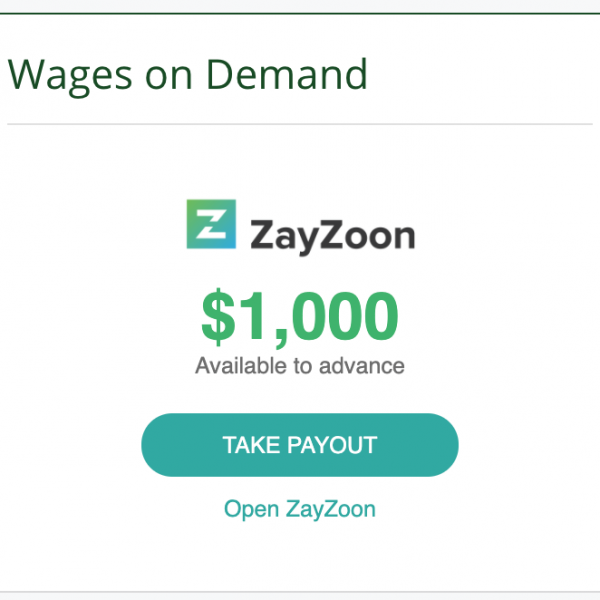 Look for the Employee Widget on the Employee Portal Dashboard
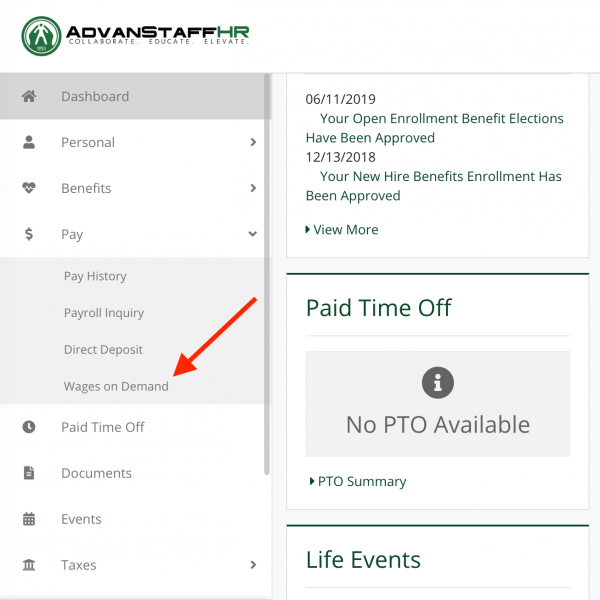 Access Wages on Demand via the u0022$ Payu0022 Menu in the Employee Portal
Frequently Asked Questions
No. This benefit is a wage advance, not a loan. The difference is that you have already worked some hours in your pay period and are taking a temporary advance from AdvanStaff HR/Zayzoon, which will be withheld from your next pay stub.
Hmm…. there could be a few reasons for this.
- Your employer has chosen not to offer this benefit. Your employer has complete control over the benefits Advanstaff HR provides. In these cases, AdvanStaff HR will disable the feature available to employees at the request of the worksite employer.
- There may be a mistake! Open a support ticket, and we will take a look.
As you can imagine, many factors are considered for each wage advance.
AdvanStaff HR / Zayzoon considers each request individually. Whether or not a wage advance is offered or the portion of wages available for the advance is based on many factors, such as:
- consistency of hours works
- time-clock punch history
- the number of hours worked in the current pay period
- the pay rate per hour
- amount of routine deductions
- the industry of the employee
An example:
If the pay period started on 7/25 and the employee is asking for an advance on 8/3 the algorithm may look like this:
Days worked = 6
Hours worked = 48 hours (6 days x 8 hours per day)
Pay rate = $18 / hour
Total waged earned = $1728 (6 x 8 x $18)
$ 1728 (total wages earned)
– $500 (benefits deductions for pay period)
– $100 (other deductions)
– $150 (taxes)
= $978 (earned wages available)
* 50% (multiplier for safety) could be a higher multiplier…..
= $489 net available for advance
With even more reductions for other factors such as industry, work schedule, etc…..
No, this is a fringe benefit offered by AdvanStaff HR / Zayzoon. Your worksite employer allows us to provide this benefit to you, but the employer does not administer the program.
AdvanStaff HR / Zayzoon work together to determine a reasonable portion to advance at any time. If you have questions about the availability of funds that can be advanced under your account with them, please contact Zayzoon directly. Zayzoon Participant Login
This benefit can be stopped or canceled at any time whatsoever.
No bank account is required. ZayZoon can provide other methods for receiving your advanced wage funds, such as a prepaid visa card, gas card, or Venmo deposit! Pay bills, make online purchases, or shop in stores without a traditional bank account.
-Instant Deposit to a bank account. No bank account? No problem! Choose one or more of these accessible alternatives!
-ZayZoon Visa Prepaid Card
-Instant Gift Card selections
-Gas Card
-Venmo Wallet
Plus, add your card to your Mobile Wallet, such as Apple Pay, Venmo, Google Wallet, and Samsung Pay!
Absolutely, your ZayZoon Prepaid Visa Card can easily be added to a mobile wallet, such as Apple Pay, Google Wallet, or Samsung Pay, for touchless transactions!
First, contact the Zayzoon Customer Support chat as soon as possible if you have questions about any transaction under their services. The chat will be recorded, and you can follow up on that interaction at any time.
If you are still unsure, you may contact AdvanStaff. Be prepared to give the date and time of your Zayzoon support chat(s), along with the name of the Zayzoon representative, so that our team can initiate further research if needed.
Zayzoon offers everyone an interactive chat service as their customer support model, available on their website.
Existing Zayzoon participants can also use their account logins to chat directly with a Support Representative!
Participants can download the Zayzoon App for mobile devices. The Customer Support Chat is available there too!
Improve your financial literacy through ZayU, an interactive learning platform that helps individuals gain financial freedom.
This demo walks us through the ZayU platform and features like overdraft prediction, balance trends, and spending tracking.
Access Zayzoon’s financial wellness through the AdvanStaff HR Employee Portal Zayzoon dashboard tile. No unique login is required!
Learn about:
- Savings
- Making a budget
- Debt
- Spending personalities
- and so much more!
ZayZoon payouts now on Venmo
Introducing a new standard in payout flexibility. Employees can send earned wages directly to their Venmo accounts for easy peer-to-peer payments and in-store or online shopping.
Please act responsibly when deciding to take a pay advance.
